








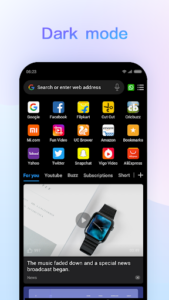
Mi Browser is a full-featured web browser designed for mobile devices, enabling users to surf the web, use search, and engage in online activities like video watching and shopping. Beyond standard browsing, it offers integrated tools to download images and videos directly from platforms like Facebook, Instagram, and Twitter, as well as save WhatsApp statuses. This integration extends to file management, allowing users to organize media on their device and secure sensitive items within a private folder.
Social Media Content Downloads
Mi Browser provides tools for directly acquiring media from various social platforms. Users can download videos and images from Facebook, Instagram, and Twitter. Additionally, the app supports saving WhatsApp statuses from friends, helping users retain important visual content.
Integrated File Management
The app includes built-in capabilities for managing media files stored on the device. Users can organize videos, audio files, and images. For sensitive content, Mi Browser offers a private folder feature, allowing users to store specific items securely and out of general view.
On-Demand Translation
For users who encounter content in unfamiliar languages, Mi Browser offers an instant translation feature. This allows users to select words and translate them directly within the browser. It’s important to note that this translation functionality is currently available only in India, Indonesia, and Russia.
Enhanced Privacy Controls
Mi Browser features an Incognito mode for private browsing sessions, ensuring that no search or browsing history is saved. A recent upgrade further enhances user control by providing an option within Incognito mode to switch aggregated data collection on or off, allowing users to manage their data sharing preferences with Xiaomi.
Convenient Browsing Features
To improve the user experience, the app incorporates several helpful features. Users can switch to a Dark mode for a different visual scheme, which can be beneficial in low-light conditions. Voice search is also available, enabling users to find information by simply speaking their query. Other included features are data saving options and a Reading mode for optimized content consumption.







Write a review